Insights
Subnet Cheat Sheet: IPv4 Masks, Host Counts and Boundaries
Look up IPv4 subnet masks, usable hosts and wildcard masks. Calculate subnet boundaries, size address blocks and compare IPv6 prefix capacities.
An IPv4 subnet cheat sheet maps a CIDR prefix to its subnet mask and address capacity. Common entries are /24 = 255.255.255.0 with 256 total addresses and 254 usable hosts, /26 = 255.255.255.192 with 64 total and 62 usable, and /30 = 255.255.255.252 with 4 total and 2 usable. A /31 has two usable addresses on a supported point-to-point link; a /32 identifies one address.
IPv4 prefixes, masks and host counts
| CIDR | Subnet mask | Total addresses | Usable hosts | Wildcard mask |
|---|---|---|---|---|
| /32 | 255.255.255.255 | 1 | 1, single address or host route | 0.0.0.0 |
| /31 | 255.255.255.254 | 2 | 2, supported point-to-point link | 0.0.0.1 |
| /30 | 255.255.255.252 | 4 | 2 | 0.0.0.3 |
| /29 | 255.255.255.248 | 8 | 6 | 0.0.0.7 |
| /28 | 255.255.255.240 | 16 | 14 | 0.0.0.15 |
| /27 | 255.255.255.224 | 32 | 30 | 0.0.0.31 |
| /26 | 255.255.255.192 | 64 | 62 | 0.0.0.63 |
| /25 | 255.255.255.128 | 128 | 126 | 0.0.0.127 |
| /24 | 255.255.255.0 | 256 | 254 | 0.0.0.255 |
| /23 | 255.255.254.0 | 512 | 510 | 0.0.1.255 |
| /22 | 255.255.252.0 | 1,024 | 1,022 | 0.0.3.255 |
| /21 | 255.255.248.0 | 2,048 | 2,046 | 0.0.7.255 |
| /20 | 255.255.240.0 | 4,096 | 4,094 | 0.0.15.255 |
| /19 | 255.255.224.0 | 8,192 | 8,190 | 0.0.31.255 |
| /18 | 255.255.192.0 | 16,384 | 16,382 | 0.0.63.255 |
| /17 | 255.255.128.0 | 32,768 | 32,766 | 0.0.127.255 |
| /16 | 255.255.0.0 | 65,536 | 65,534 | 0.0.255.255 |
CIDR notation gives the number of network-prefix bits after the slash. The subnet mask expresses that same boundary in dotted-decimal form, while the wildcard mask is its inverse: subtract each mask octet from 255. A longer prefix leaves fewer host bits, so it describes a smaller address block.
Use total addresses to understand the block’s size and usable hosts to estimate ordinary interface capacity. For ordinary broadcast subnets, the network and broadcast addresses account for the difference between those columns. The qualifications beside /31 and /32 matter: their counts do not follow the ordinary subtraction rule.
Find the network, host range and broadcast
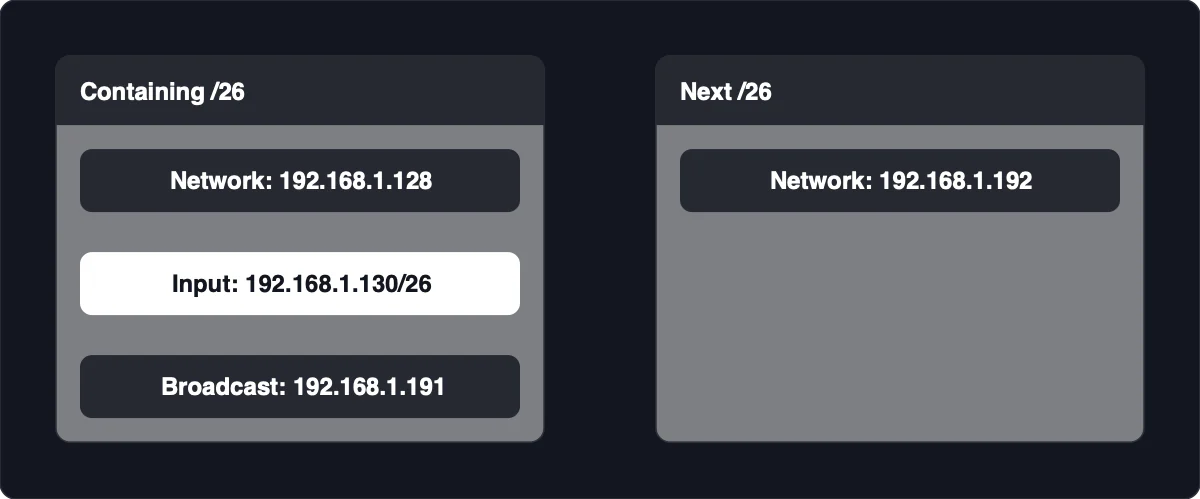
Find the subnet containing an address by locating the boundary at or below that address, then finding the last address before the next boundary. For 192.168.1.130/26, the result is network 192.168.1.128, ordinary hosts 192.168.1.129 through 192.168.1.190, and broadcast 192.168.1.191.
-
Translate the prefix into a mask. A /26 uses
255.255.255.192. Its changing octet is the last octet, where the mask value is 192. -
Calculate the increment in that octet. The increment equals 256 minus the mask value, so
256 - 192 = 64. Subnet boundaries therefore occur at last-octet values.0,.64,.128and.192. -
Find the containing boundary. The address’s last octet, 130, lies between 128 and the next boundary, 192. Keep the common prefix and use the lower boundary:
192.168.1.128. -
Find the broadcast address. Take the address immediately before the next subnet,
192.168.1.192. That gives192.168.1.191, matching the /26 boundary and host-range pattern. -
Remove the ordinary reserved endpoints. The first host follows the network address, and the last host precedes the broadcast address. Here, the ordinary usable range is
192.168.1.129through192.168.1.190.
The increment belongs to the changing octet, so it is not always the total address count. With /23, the mask is 255.255.254.0: the increment is 2 in the third octet, but the block contains 512 addresses. Set any trailing host octets to .0 for the network boundary and .255 for the broadcast boundary.
This calculation establishes address membership, not connectivity. Matching subnet arithmetic does not establish that routes, firewalls or interfaces are configured correctly. If a calculator gives a different result, check the entered prefix and the octet used for the increment before changing configuration.
Quick boundaries when splitting a /24
Within a single /24, prefixes from /25 through /30 advance in the last octet. Each longer child prefix produces smaller blocks and more child subnets within that same parent.
| Child prefix | Last-octet increment | Child subnets within one /24 | Ordinary usable hosts per child |
|---|---|---|---|
| /25 | 128 | 2 | 126 |
| /26 | 64 | 4 | 62 |
| /27 | 32 | 8 | 30 |
| /28 | 16 | 16 | 14 |
| /29 | 8 | 32 | 6 |
| /30 | 4 | 64 | 2 |
The subnet counts and boundary patterns are relative to the parent block. “Four /26 subnets” means four inside a /24, not four inside every possible parent network. A larger parent can contain more children of the same prefix.
For the parent 192.168.1.0/24, all addresses below share the first three octets, 192.168.1. Its complete /26 split is:
| Network | First ordinary host | Last ordinary host | Broadcast |
|---|---|---|---|
| 192.168.1.0/26 | 192.168.1.1 | 192.168.1.62 | 192.168.1.63 |
| 192.168.1.64/26 | 192.168.1.65 | 192.168.1.126 | 192.168.1.127 |
| 192.168.1.128/26 | 192.168.1.129 | 192.168.1.190 | 192.168.1.191 |
| 192.168.1.192/26 | 192.168.1.193 | 192.168.1.254 | 192.168.1.255 |
Read each row as one complete block: network first, ordinary hosts in the middle, broadcast last. To check a boundary table, confirm that each broadcast immediately precedes the next network and that each ordinary host range excludes both endpoints. This makes a misplaced host-range endpoint easier to catch before you use the table for address assignments.
Size a private subnet for devices and services
Choose the smallest ordinary subnet whose usable-host capacity covers your complete address budget, including infrastructure and deliberate growth room. Count addresses you intend to assign, not just the devices you can see today.
-
List the planned assignments. Include personal devices, self-hosted services and any other interfaces that need addresses on this subnet. Count each required address rather than assuming every device needs only one.
-
Include network infrastructure. Add the gateway and any management or service addresses that belong in the same subnet. These consume usable addresses even when they are not part of a dynamic assignment pool.
-
Allow deliberate growth room. Include expected additions in the budget before selecting a prefix. This keeps the capacity decision tied to your plan rather than to a familiar mask.
-
Compare the budget with the usable-host column. Choose the smallest subnet that meets the segment’s needs, then select an aligned network boundary. Confirm that your proposed assignments stay within its ordinary host range.
For example, a complete budget of 30 addresses fits a /27, which has 30 ordinary usable addresses. A /28 provides only 14 and would be too small. If your budget grows beyond 30, a /26 provides 62 ordinary usable addresses.
These private IPv4 blocks provide address space from which you can plan smaller subnets:
| Private block | Subnet mask | Address range |
|---|---|---|
| 10.0.0.0/8 | 255.0.0.0 | 10.0.0.0 through 10.255.255.255 |
| 172.16.0.0/12 | 255.240.0.0 | 172.16.0.0 through 172.31.255.255 |
| 192.168.0.0/16 | 255.255.0.0 | 192.168.0.0 through 192.168.255.255 |
Private addressing is an address-planning choice, not encryption or access control. Plan those protections separately, and do not treat a private address as proof that a service is isolated. Likewise, the usable-host count is not automatically your DHCP pool size: static assignments, configured exclusions and platform reservations can leave fewer addresses available for dynamic allocation.
IPv6 prefix sizes at a glance
IPv6 uses 128-bit addresses and prefix notation, but its quick reference is best read separately from IPv4 host counts. For larger allocations, the useful comparison here is how many /64 subnets fit inside the block.
| IPv6 prefix | Reference capacity |
|---|---|
| /48 | 65,536 /64 subnets |
| /56 | 256 /64 subnets |
| /60 | 16 /64 subnets |
| /64 | 1 /64 subnet |
| /127 | 2 total addresses |
| /128 | 1 total address |
The /64 subdivision counts describe parent-and-child relationships, not mandatory allocation sizes. A /56 contains 256 /64 subnets, while a /60 contains 16. Read the /127 and /128 rows differently: they show total addresses, not counts of /64 subnets.
Do not carry the ordinary IPv4 network-and-broadcast subtraction into IPv6. The table gives address-space capacity, not a guarantee that every prefix is suitable for every link or deployment. Use the allocation and link requirements of your network rather than treating /48, /56 or /64 as universal requirements.
When the usable-host shortcut does not apply
For ordinary IPv4 broadcast subnets, total addresses = 2^(32 - prefix), and ordinary usable hosts = total addresses minus two. The subtraction accounts for the network and broadcast addresses. A /26 therefore has 64 total addresses and 62 ordinary usable hosts, as shown in the IPv4 capacity table.
A supported /31 point-to-point link uses both addresses, so subtracting two would give the wrong result. A /32 represents one address, including single-address or host-route use. Choose the counting rule for the prefix and link type rather than applying the ordinary shortcut mechanically.
An address written with a prefix is not necessarily the normalized network address. In 192.168.1.130/26, the address is inside the subnet, while 192.168.1.128/26 names its network boundary. Similarly, an address ending in .0 or .255 is not automatically unusable: in a larger block, either can fall inside the host range rather than at the complete subnet’s endpoints.
Configured pools and platform reservations can reduce what you can actually assign without changing the subnet’s mathematical capacity. Keep the block’s total addresses, its ordinary usable range and your configured assignment pool distinct. If the available pool is smaller than expected, inspect its boundaries, exclusions and reserved assignments before changing the subnet size.