Insights
Secure Internal Communication: Protect Messages, Calls, Files, and Services
Learn how to secure internal messages, calls, files, and services with encryption, access controls, device protection, policies, and practical checks.
Secure internal communication means protecting information exchanged within your organization so that intended participants can access it, unauthorized parties cannot readily read or change it, and teams can keep working. It covers chat, email, voice and video calls, file sharing, and collaboration tools. Build it with approved communication channels, appropriate encryption, strong authentication, least-privilege access, protected devices, clear sharing and retention rules, and regular checks. Encryption alone is not enough.
What you need to protect
Protect the information, its accuracy, and your team's ability to use it. These goals are called confidentiality, integrity, and availability. They apply throughout a conversation's life, including shared attachments and retained records.
Consider a team sharing a confidential project plan. Confidentiality means only the intended audience should be able to read it. Integrity means protecting the plan against unauthorized changes, so a substituted attachment or altered instruction does not silently become the team's working version. Availability means authorized colleagues can retrieve the plan when they need it, including through an approved recovery process.
“Internal” describes the intended organizational audience, not everyone connected to the office network. A remote employee may belong in the discussion, while a visitor on the office network may not. An invited contractor may need one project channel without needing access to other confidential work.
The practical foundation is governance, culture, and tools working together. A protected channel still needs clear membership, responsible sharing, and people who know how to report suspicious requests.
Identify how internal information can escape
Start with compromised identities, incorrect permissions or recipients, exposed channels, and compromised devices. Misrouted messages, unauthorized access, compromised credentials, and insecure channels can expose information or disrupt work. Grouping risks this way helps you choose controls that address the actual failure.
A contractor left in a project channel has access that may no longer be justified, even if every message is encrypted. Review channel membership when assignments end, not just when accounts are created. Similarly, checking recipients and link permissions before sharing a confidential plan addresses accidental disclosure that encryption cannot correct.
A fake executive request targets your judgment or identity controls rather than the encryption. An internal-looking sender name is not proof that the request is authorized. Confirm unusual requests for sensitive files or access through a known, separate channel.
Device compromise creates another route to content after it reaches a legitimate participant. Office-network access does not establish that a device is trustworthy or its user is entitled to a particular conversation. Protect devices and keep communication software current, because missed updates can leave known vulnerabilities open.
Match each protection to the risk it addresses
Each control protects a particular boundary. Choose it for that boundary rather than treating “encrypted” or “private” as a complete security description.
| Protection | Protected boundary | Remaining exposure |
|---|---|---|
| Transport encryption, such as TLS | Protects traffic along a connection between its endpoints. | An endpoint that terminates the connection may access plaintext. This does not automatically provide application end-to-end encryption. |
| Application end-to-end encryption | Protects content between participating endpoints without giving intermediaries content-decryption access. | Authorized recipients, compromised endpoints, screenshots, and recordings can still expose content. |
| Storage encryption | Protects stored data under its encryption and key-access model. | A running application or user with decryption access may still read the content. |
| Authentication | Establishes the identity of a user or device. | A valid identity does not establish permission to access every channel or file. |
| Authorization and least privilege | Determines what an authenticated identity may access or change. | Excessive permissions and outdated membership can still expose information. |
| Network segmentation | Limits reachability between network areas or services. | Reachability restrictions do not replace application authentication, permissions, or encryption. |
For the project plan, TLS may protect your connection to a communication service while leaving that service able to process the content. With application end-to-end encryption, content is encrypted at the sender and decrypted at the intended recipient. Check which participants and features use that model rather than assuming it applies to every conversation, attachment, or integration.
Permissions answer a separate question: who should receive the plan at all? Apply least privilege by giving people only the access they need, and use network segmentation to limit access to sensitive areas where appropriate. Neither control prevents an authorized recipient from copying content.
Put a workable communication policy into practice
Approved tools, authentication, least privilege, device protection, and training form the baseline. Add retention, export, and audit requirements where your organization's obligations require communication records. Make each policy decision produce something your team can use and review.
-
Inventory tools and data flows. Identify approved and unapproved tools and map the data moving through them. Include messages, calls, files, guest access, and integrations. Deliverable: a channel-and-data map with an owner for each service.
-
Classify information and identify obligations. Distinguish routine collaboration from confidential project plans and other sensitive material. Identify organizational recordkeeping and access requirements. Deliverable: a handling guide describing where each information category may be shared and retained.
-
Select approved channels. Check encryption boundaries, identity controls, guest handling, and recovery options against the intended use. Explain which channels are approved and why. Deliverable: a usable channel guide, including alternatives for work currently happening in personal apps.
-
Enable strong authentication and least privilege. Use multifactor authentication, which requires more than a password, where supported. Assign access according to work responsibilities and review it after role changes and departures. Deliverable: reviewed permissions and an account-change procedure.
-
Separate guest collaboration from confidential discussions. Give contractors and other guests access to the material they need without automatically including them in unrelated conversations. Deliverable: a reviewed guest-membership list and clear sharing boundaries.
-
Protect and update devices. Use appropriate device encryption, endpoint management, timely updates, and remote-wipe capabilities for devices accessing sensitive data. Deliverable: a device-protection baseline and a process for handling exceptions or lost devices.
-
Assign review and incident owners. Name who reviews access, handles suspicious messages, and coordinates recovery. Explain reporting and sharing rules to users rather than merely prohibiting tools. Deliverable: an access-review schedule and an incident-reporting path people can find.
Add a private network for internal services when needed
Communication-platform controls are the starting point. Add private network reachability when your team operates a self-hosted chat service, file service, or another internal application that should not be publicly reachable. Restrict access to the devices that need it while retaining application authentication, authorization, and encryption.
For example, a private file service may need to be reachable by project devices but not by unrelated devices. That network boundary reduces exposure; it does not decide which files each authenticated user may open. Keep remote administration off the public internet and maintain a protected administrative access path.
Self-hosting gives you infrastructure control, but managed hosting may be more practical when your team cannot reliably maintain the service and its security updates. Choose based on your capacity to operate the system securely, not on the assumption that owning the server makes its communications safe.
For private communication and service connectivity, doxx.net is a private network with P2P end-to-end encrypted chat, voice and video calls, device-to-device file transfer, firewalls, private domains, and private PKI certificates. Those capabilities do not by themselves establish enterprise identity management, archiving, data loss prevention, or compliance suitability. If this matches your need, use the website's Get Started and Download paths to create a doxx.net account, download the app, and connect a device.
Resolve privacy, retention, and oversight requirements
Minimizing retained sensitive content reduces exposure; controlled retention is necessary when legal, operational, or investigation requirements justify keeping records. Set retention by information category and purpose rather than keeping everything indefinitely or deleting everything automatically. Your policy should balance recordkeeping requirements with protection of current and historical communications.
For the confidential project plan, decide whether the authoritative document needs to be retained separately from the surrounding discussion. Some organizations also need controlled exports or audit trails to demonstrate that communication protocols were followed. Limit archive access to authorized roles and disclose monitoring practices to participants.
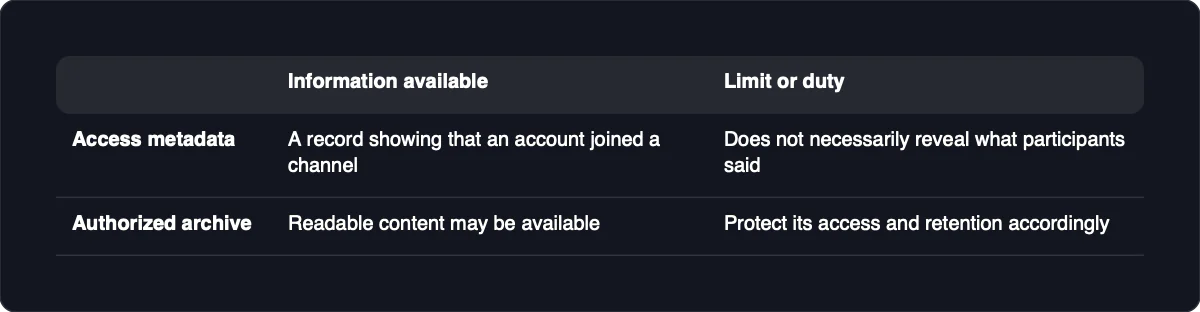
Access and administrative metadata are different from message-content inspection. A record showing that an account joined a channel does not necessarily reveal what participants said. Before enabling an archive, bot, integration, or authorized export, determine how it receives plaintext and whether that fits your intended end-to-end encryption model.
An archive acting as an authorized recipient creates another place where readable content may be available. Protect its access and retention accordingly rather than assuming the original encryption protects every downstream copy. Security features support an assessment of your obligations; selecting a tool or private network does not automatically establish legal compliance.
Check that your controls work
Use authorized test accounts and non-sensitive files to check the boundaries you intended to create. Each check should record the expected result, what the result establishes, and the action to take if it differs.
-
Try a restricted channel from an out-of-scope account. Expect access to be denied. This validates that account's tested permission boundary, not every route into the content. If access succeeds, review membership, inherited permissions, and sharing links, then repeat the check.
-
Test departure handling. Apply your departure procedure to a designated test account, then attempt access through an existing session and a fresh sign-in. Expect both to fail where access was revoked. If either works, inspect group membership, sessions, tokens, and guest links before retesting.
-
Try a private service from an unauthorized device. Expect the service to be unreachable through the tested path. This checks that network boundary, not application permissions or every possible route. If it remains reachable, review network rules and alternative exposure paths, then test again.
-
Exercise an approved recovery procedure. Expect an authorized participant to regain access without granting unintended permissions or bypassing identity checks. This tests recovery as well as availability. If it fails, correct the procedure and repeat it using non-sensitive material.
-
Check the encryption model separately. Successful message delivery proves delivery, not end-to-end encryption. Inspect the documented mode, participant coverage, and key-handling behavior against your requirements. If coverage differs, adjust the channel, feature, or participant arrangement before sharing sensitive content.
Review these checks when permissions, integrations, or network rules change, and keep software updates and incident procedures under regular review. Run incident-response drills so employees can act promptly, then address unclear responsibilities or failed reporting paths uncovered by the exercise.