Insights
EAP methods for Wi-Fi: what they mean and which to choose
Understand EAP-TLS, PEAP and EAP-TTLS, match your enterprise Wi-Fi profile, validate server certificates and troubleshoot authentication failures.
An EAP method is the authentication mechanism your device uses to join an 802.1X enterprise Wi-Fi network, such as WPA2-Enterprise or WPA3-Enterprise. EAP means Extensible Authentication Protocol.
Common choices include EAP-TLS, which uses client and server certificates, and PEAP or EAP-TTLS, which establish a TLS tunnel and commonly authenticate you with a username and password inside it. If you are joining an existing network, use the method and settings supplied by its administrator, not whichever option looks strongest. Ordinary WPA2-Personal networks using a shared password do not require an EAP method.
Where EAP fits in an enterprise Wi-Fi connection
Enterprise Wi-Fi uses EAP to carry an authentication exchange before allowing ordinary network access. EAP is a framework, not a specific authentication mechanism: the selected method defines how the device and authentication server establish trust and prove the required identity. That distinction explains why selecting “Enterprise” security is not enough to complete a Wi-Fi profile.
The exchange involves your device, the access point and an authentication server, commonly RADIUS. Your device runs the supplicant, the software that requests access; the access point acts as the authenticator, controlling admission to the network. The access point relays EAP messages between your device and the authentication server while blocking normal traffic until authentication succeeds.
The method determines what your device must present, such as a client certificate or credentials inside a protected tunnel. The network’s configuration determines which methods it accepts, so the options visible on your device are not a menu of interchangeable ways to connect.
Personal Wi-Fi follows a different path. A home network asking only for its shared WPA2-Personal password does not use this EAP authentication exchange. If you expected shared-password access but see EAP, identity and certificate fields, confirm that you selected the intended network and security mode.
Compare certificate-based and tunneled methods
EAP-TLS authenticates the client and server with certificates. PEAP and EAP-TTLS authenticate the server and establish a TLS tunnel, then perform a separately configured authentication exchange inside it. TLS protects that exchange, but your device still needs the correct trust settings and inner authentication method.
| Method | Client credentials | Server trust requirements | Inner authentication | Deployment considerations |
|---|---|---|---|---|
| EAP-TLS | Client identity certificate | Validate the server certificate against the approved trust configuration and expected server names | No separate password-based inner method in the usual EAP-TLS setup | Requires client certificate enrollment, assignment, renewal and removal |
| PEAP | Commonly a username and password; certificate-based client authentication is also possible in some configurations | Validate the server certificate before sending inner authentication material | MSCHAPv2 is an example, not a universal setting | Match the inner method and credential requirements to the network profile; check client support |
| EAP-TTLS | Commonly a username and password; certificate-based client authentication is also possible in some configurations | Validate the server certificate before sending inner authentication material | PAP is an example; other inner methods are possible | Match both the tunnel method and the inner method to the server configuration |
The certificate-based model of EAP-TLS provides mutual authentication: the client checks the server, and the server checks the client. This makes it a useful choice when administrators can manage certificates throughout their lifecycle. It does not remove the need to configure server validation correctly or keep client certificates valid.
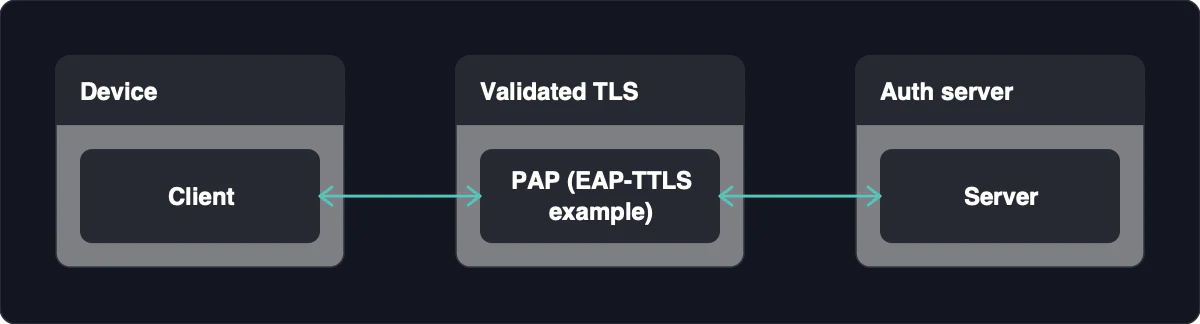
PEAP with MSCHAPv2 and EAP-TTLS with PAP illustrate why a profile can contain both an EAP method and a phase-two, or inner authentication, setting. PAP inside a correctly validated TLS tunnel is different from transmitting a password without tunnel protection: the tunnel protects the exchange in transit. A client field labeled “unencrypted password” for inner authentication should therefore be read in its tunnel context, not as permission to skip server validation.
Other methods exist, including EAP-FAST and TEAP, but support varies by client and authentication server. EAP-FAST uses Protected Access Credentials, or PACs, and can use an identity and password. Their presence in a settings menu does not mean your network accepts them.
Match your device settings to the network profile
When joining an existing enterprise network, reproduce its authorized profile rather than choosing a method independently. Field labels and supported methods vary across clients, so use the administrator’s instructions for your device instead of assuming that every settings screen works alike.
-
Obtain the authorized network profile. Get the configuration through the organization’s approved channel. You need the intended network name, security mode, EAP method, any inner authentication setting, and the required trust and identity information.
-
Confirm the network name and Enterprise security mode. Match the SSID, meaning the Wi-Fi network name, and the supplied security type. If those differ from the profile, resolve the mismatch before entering credentials.
-
Match the outer EAP method and any phase-two setting. Select the specified method, then its required inner authentication mechanism where applicable. A profile specifying PEAP with MSCHAPv2 cannot simply be changed to EAP-TLS unless the network is configured to accept that method and you have the required client identity.
-
Install or select the approved trust material. Configure the trusted root certificate and expected server certificate names supplied for the network. For certificate-based client authentication, also select the required client identity certificate; it serves a different purpose from the certificate used to trust the server.
-
Enter the required identity and credentials. Use the administrator’s identity format rather than guessing whether the network wants a short username or a longer account identifier. Configure an outer identity separately if the profile calls for one.
-
Connect and check the result. Successful authentication shows that the network accepted the configured authentication exchange. If it fails, keep the supplied method and investigate the profile, certificates or credentials rather than switching methods at random.
For administrators designing a new deployment, favor certificate-based authentication when enrollment and lifecycle management are feasible. Check that the intended clients and authentication server support the chosen configuration before rollout. A certificate-based design that cannot reliably deliver valid client certificates will create access problems, even if its authentication model is attractive.
Protect your credentials and outer identity
Server validation and identity privacy solve different problems. Validation helps your device distinguish the expected authentication server from an impostor; an anonymous outer identity reduces exposure of your username during the initial exchange. Configure both according to the authorized profile, without treating either as a substitute for the other.
-
Obtain the expected server names and trusted CA through an authorized channel. A certificate authority, or CA, is the authority your client trusts to issue the relevant server certificate. Do not use an unexpected connection prompt as the sole basis for deciding what to trust.
-
Configure server validation using your client’s supported settings. Apply the supplied trust material and server-name restrictions. Failing to validate the server certificate and its issuing CA can allow a rogue access point to harvest MSCHAPv2 authentication material.
-
Stop when the certificate is unexpected. Ask the administrator to confirm the certificate, issuing authority and server name before proceeding. Do not disable validation or accept arbitrary certificates just to make the connection work.
-
Use an approved anonymous outer identity where supported. For tunneled methods, outer-identity privacy can mask the username in the outer exchange. Use the exact format approved for the network, rather than assuming that entering
anonymousis always sufficient.
The outer identity and inner identity are not the same thing. The real identity remains part of inner authentication when the network requires it, so masking the outer username does not hide you from the authentication server. It also does not make the connection anonymous or prevent every tracking technique.
Diagnose authentication failures before changing methods
Compare the failing device’s configuration with an authorized profile and use authentication logs to narrow the problem. A known-good device, the failing device and the authentication logs together provide a better diagnostic starting point than repeatedly changing EAP options. Make changes only on devices you own or are authorized to administer, and preserve the original profile so you can restore it if a change breaks access.
-
Compare the profiles, not just the network names. Check the failing device against the authorized configuration and, where appropriate, a working device. Differences can identify a setup problem, but do not copy another user’s credentials or identity certificate; correct the failing device with its own approved profile.
-
Verify the outer and inner methods. Confirm that the EAP method and any phase-two setting match what the network accepts. A mismatch points to configuration rather than proving that the password is wrong; restore the specified combination before testing again.
-
Check server trust, expected names and certificate validity. Confirm that the required trusted CA is configured and that the presented server identity matches the approved names. A certificate-name mismatch or unexpected certificate calls for administrator verification, not a validation bypass.
-
Check the client’s authentication material. For EAP-TLS, confirm that the correct client certificate is present, assigned and valid; missing, expired or incorrectly assigned certificates can cause authentication failures. For password-based methods, verify the required identity and account credentials through the authorized process rather than exposing them during troubleshooting.
-
Ask an authorized administrator to inspect authentication logs and policy results. A rejection directs attention to credentials, certificates or access policy. Use the recorded reason to choose the next check instead of assuming that every rejection requires a different EAP method.
These checks separate a client-profile problem from a server-side decision. A working device shows that at least its configuration and identity can connect; it does not prove that another account or device has the same permissions. If profiles match but one device is rejected, the administrator should examine that device’s credentials, certificate assignment and policy result.
Successful authentication followed by no usable network connection is a different diagnostic branch. Check address assignment, VLAN placement, DNS and routing rather than changing a working authentication method. Those checks establish whether the admitted device received usable network access after EAP completed.
Understand the limits of Wi-Fi authentication
A strong EAP method helps authenticate network access; it does not by itself provide end-to-end protection for every application. Network admission, Wi-Fi link protection and application-level protection are distinct responsibilities. Successful EAP authentication does not establish anonymity, make every service trustworthy or prevent every attack.
Certificate-based authentication is therefore a qualified recommendation, not an absolute security guarantee. EAP-TLS remains dependent on correct server validation, appropriate client certificate assignment and ongoing certificate lifecycle management. A valid authentication exchange also does not tell you how a service handles your data after receiving it.
For private communication, consider the protection provided by the application as well as the network connection. End-to-end protection concerns the communicating endpoints, while EAP concerns admission to the enterprise network. A private network or encrypted application does not replace the enterprise network’s requirement for valid Wi-Fi credentials and the correct EAP profile.
EAP-FIDO is a proposed method for 802.1X-protected networks, intended to provide passwordless authentication. It is not a routine option available in every current Wi-Fi client. Deployment requires compatible client and authentication-server implementations, not access-point replacement alone; select it only as part of an explicitly supported network configuration.