Insights
On-path attacks: how interception works and how to protect your traffic
An on-path attacker intercepts traffic between devices. Learn how attacks work, what HTTPS protects, which warning signs matter, and how to respond.
An on-path attack occurs when an attacker gains a position between communicating devices and intercepts, redirects, or alters their traffic. It is commonly called a man-in-the-middle (MITM) attack. Being on the path does not automatically let an attacker read encrypted content: properly validated HTTPS/TLS limits what they can see and change, although traffic metadata can remain visible.
Interception starts with a position in your traffic path
The basic flow is your device → attacker-controlled intermediary → intended service. The intermediary can forward your requests and the service’s responses, allowing the connection to keep working while traffic passes through the attacker’s position. For example, a rogue hotspot can provide an apparently usable connection without being a trustworthy place to send unprotected information.
A passive on-path attacker monitors communication without changing it. An active attacker attempts to alter the exchange, such as redirecting a request or modifying unprotected content. The distinction matters because an attack does not need to produce a visible failure: observation alone can threaten privacy when the traffic exposes sensitive information.
“On-path” emphasizes the attacker’s position somewhere along the communication route, not necessarily beside your device. “MITM” usually names the same attack category. Neither term means that the attacker has automatically defeated encryption, taken over your account, or compromised either endpoint.
For your privacy, separate access to the traffic path from access to the message itself. An attacker might observe encrypted traffic without learning its contents, while ordinary HTTP can expose the information being exchanged. A phishing page, compromised account, or infected device is not by itself evidence of an on-path attacker, even though those problems can also put your information at risk.
Common ways an attacker gets between you and a service
Some techniques establish an interception position; others exploit one that already exists. Rogue Wi-Fi and local-network redirection can place traffic under an attacker’s control. SSL stripping is different: it attempts to keep your side of an intercepted connection unencrypted rather than decrypting a working HTTPS session.
| Mechanism | Where it acts | Protection it tries to defeat |
|---|---|---|
| Rogue Wi-Fi | The wireless network you join | Your assumption that the access point provides a trustworthy route. Attackers can exploit weak wireless security to intercept activity, but controlling the hotspot does not itself defeat validated HTTPS. |
| ARP spoofing | A local network that uses Address Resolution Protocol | The local mapping between network addresses and devices. An attacker falsely associates their device’s address with the gateway’s address, redirecting local traffic through their device. |
| DNS spoofing | The process that translates a hostname into a network address | Your expectation that a lookup leads to the intended destination. Manipulated responses can redirect users toward malicious websites, but redirection alone does not supply a valid certificate for the intended HTTPS hostname. |
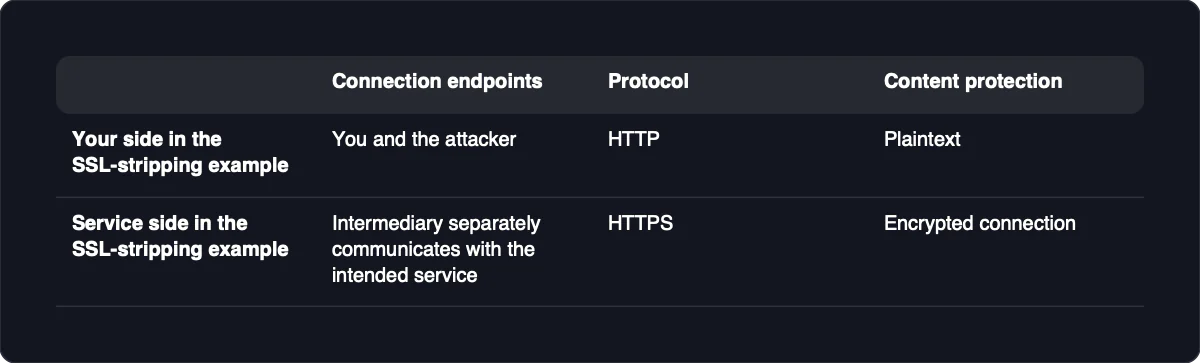
| SSL stripping | The connection between your device and an intermediary | The transition from an insecure connection to HTTPS. The intermediary uses HTTPS toward the service while serving HTTP to you, leaving the victim-facing connection in plaintext. |
ARP spoofing concerns the next destination on your local network. DNS spoofing concerns the address returned for a name. Neither should be treated as a universal explanation for interception: a changed DNS answer can be legitimate, and not every malicious DNS redirection involves an attacker sitting on your existing traffic path.
Session-token theft is a possible consequence of exposure, not a requirement for getting on the path. A token represents an authenticated session, so an attacker who obtains a usable token may not need to steal the password as well. The important question is whether sensitive traffic or session information became accessible, not merely whether an unfamiliar intermediary existed.
What an attacker can see when HTTPS is working
Ordinary HTTP traffic is plaintext on the connection. An on-path attacker can read intercepted content and may alter it. Properly validated HTTPS/TLS protects the content between the communicating endpoints when those endpoints and their trust configuration remain intact.
Capturing encrypted packets is not the same as obtaining their plaintext. Even when encryption holds, an attacker can observe which servers you contact, when, and how frequently. That distinction is important for privacy: the contents of a conversation may remain confidential while its destination and pattern of activity remain visible.
SSL stripping avoids HTTPS on your side of the connection; it does not decrypt an already established, correctly validated TLS session. You might be communicating with the intermediary over HTTP while the intermediary separately communicates with the intended service over HTTPS. The service’s encrypted connection therefore does not protect the plaintext leg between you and the attacker.
HSTS limits this downgrade by directing the browser to use HTTPS. Its protection applies when the browser already knows an applicable policy, including through preloading; a first visit can remain exposed when neither a learned nor a preloaded policy applies. Check the connection you actually have, rather than assuming that a service’s support for HTTPS means every visit used it.
Certificate validation is part of this protection, not an optional obstacle. Accepting a certificate warning can undermine the authentication that tells your device which service it is communicating with. A valid HTTPS connection authenticates the hostname and protects the connection’s content; it does not establish that the website’s operator is honest or conceal every traffic metadata field.
Choose protection for the communication you need to keep private
Match the protection to the information you want to keep private and the endpoints that should receive it. Browsing, private conversations, and connections to self-hosted services have different boundaries. A protected route is useful, but it does not replace verification of the service or control over who can use it.
| Communication | Relevant control | Protected boundary | What you still need to check |
|---|---|---|---|
| Browsing | HTTPS/TLS with proper certificate verification | Content between your browser and the authenticated service | The hostname is the one you intended, validation succeeds, and you are not using an unexpected HTTP connection. HTTPS does not establish the website’s honesty. |
| Private messages and calls | End-to-end encryption for sensitive communication | Message or call content between the participating endpoints | The participants and devices are the intended ones. Content remains accessible at the endpoints after decryption. |
| Device-to-service or agent-to-service connections | Authenticated encrypted connections plus appropriate access controls | Traffic between the connecting device or agent and its intended service | The service identity validates, credentials are protected, and permissions fit the task. Network access alone should not authorize every action. |
For private services, authentication deserves the same attention as encryption. Digital certificates support secure authentication through PKI, but the connection must still validate the identity you intended to reach. An encrypted connection to the wrong service does not solve the original privacy problem.
Adding a private network or another encryption layer can protect a communication boundary without protecting everything beyond it. Application authentication and access controls still matter. No transport layer protects data after a compromised endpoint decrypts it, and no single control prevents every form of interception or exposure.
Multi-factor authentication helps reduce many account-takeover risks, but it is not a universal defense against session theft. An intercepted session token can let an attacker impersonate an authenticated user without the password when the application permits its replay. Treat protection of active sessions as a separate requirement from protection of the initial login.
Warning signs are reasons to investigate, not proof
A warning can establish that something is wrong without establishing why. Certificate problems, unexpected plaintext connections, and unexplained redirects deserve attention because they can affect the protection you expected. Stop sensitive activity while you investigate rather than trying to make the warning disappear.
| Observation | What it establishes | Next action |
|---|---|---|
| Certificate warning | Certificate validation failed. Warnings may report an expired or untrusted certificate; interception is only one possible cause. | Do not bypass the warning. Check the intended hostname and retry from an independently trusted connection. |
| Unexpected HTTP connection | The current connection lacks HTTPS protection. It does not establish whether a downgrade attack occurred. | Stop entering sensitive information. Use the service’s known HTTPS address and confirm that validation succeeds. |
| Redirect or hostname change | Your browser reached a different address or name. The reason may be legitimate or malicious. | Compare the destination with the address you intended to use. Avoid signing in until you understand the change. |
| Unexpected local ARP mapping | The observed local address mapping differs from what you expected. A legitimate network change remains possible. | If you administer the network, compare it with the known gateway configuration; otherwise contact its administrator. |
| Changed DNS answer | A lookup returned a different destination. Legitimate infrastructure changes can cause this. | Check with the service or network administrator before treating the change as malicious. |
| Network slowdown | Performance changed. Latency alone is weak evidence of interception. | Compare it with normal behavior and look for corroborating observations rather than diagnosing an attack from delay alone. |
Certificate expiry and configuration mistakes can produce warnings without an attacker. Similarly, DNS changes and redirects can be part of ordinary service operation. The useful question is what changed, whether the change is expected, and whether the connection still authenticates the intended service.
For technical investigation, timing changes are noisy and work best alongside other indicators and a baseline. An isolated slow connection offers little diagnostic value. Normal-looking traffic is also not proof that interception is absent, because a passive observer need not alter the exchange and a forwarding intermediary can keep it functioning.
Respond from a trusted connection
Act promptly when you suspect an on-path attack, but distinguish containment from diagnosis. You can stop further exposure before you know whether the cause is interception, a service error, or a device problem.
-
Stop entering secrets. Pause logins, payments, private messages, and other sensitive activity on the affected connection. Do not accept certificate errors to continue, because doing so removes an important identity check.
-
Leave the suspect network. Disconnect and use an independently trusted connection. Simply reconnecting to the same hotspot does not give you an independent comparison.
-
Record what you observed. Note the hostname, the warning or unexpected behavior, and the time. Keep the record focused on your own connection; you do not need to collect other people’s traffic.
-
Verify the service through a known address. Use an address you already trust rather than following the suspicious redirect. If certificate validation still fails, stop and contact the service administrator through an established channel.
-
Protect potentially exposed accounts. From a trusted device and connection, change passwords that may have crossed an unprotected connection and revoke active sessions where the service allows it. Revocation matters because a stolen session token may permit impersonation without another password login.
-
Review activity and report the problem. Check affected accounts for unfamiliar sessions or actions. Contact the account provider or network administrator with the hostname, timing, and warning details so they can investigate the relevant service or network.
A warning that disappears on another network narrows the investigation toward differences between the connections, but it does not prove an attack occurred. A warning that persists warrants checking the device and the service as well. Resume sensitive activity only when the intended connection validates successfully, not merely because the page loads again.