Insights
Can website owners see who visits?
Website owners can see visit data, but usually not your name. Learn how logins, cookies, and identity matches affect privacy and what you can limit.

Yes, website owners can usually see that a visit occurred and collect information such as the connection’s IP address, pages requested, and browser details. That does not normally reveal your name or exact home address. A site may recognize your browser across visits, and it can connect activity to you through an account, information you submitted previously, or a successful match with outside identity data.
For example, an unfamiliar browser can leave a record showing that someone requested a page at a particular time. That record can describe the visit without telling the owner who the person was. If you make the same visit while signed into an account, the site can associate the activity with that account and the information attached to it.
The important distinction is between seeing a visit, recognizing a browser, and identifying a person. A traffic report may count visits or show browsing patterns without displaying visitor names. A persistent browser identifier can connect repeat visits without, by itself, proving that the same person made them.
Information being collected also does not establish that the owner actually reviewed it. A recorded request, an analytics report, and a person looking through those records are different things. Visiting a personal website therefore does not automatically mean its owner received your name or noticed your particular visit.
What your visit can reveal
A website can receive technical information through the page request itself and collect additional information through tracking features it runs in your browser. Server logs and security tools differ from optional analytics and marketing tools, such as pixels and tag managers. Blocking a browser-based analytics script does not mean the server received no request.
| Signal | What it can reveal | What it does not prove |
|---|---|---|
| Connection IP address | The public network address visible to the destination, which can be used to estimate location. | Your name, a unique person or household, or your exact street address. |
| Approximate location | An estimated city or region associated with the IP address. | That you live in that city, or that a particular home made the visit. |
| Requested pages and timestamps | Which pages were requested and when. | Who requested them, why they visited, or whether they read everything on the page. |
| Browser details | Browser and device characteristics exposed during the visit. | A particular person’s identity merely because their browser has those characteristics. |
| Cookies and local storage | Persistent identifiers that can help recognize repeat visits and connect activity across sessions. | Your name or email address unless the site has an additional identity link. |
| Referrer information | Information about where a request came from, when the browser supplies it. | The exact previous page in every case, or your complete browsing history. Referrer information may be absent or limited. |
| Measured interactions | Clicks, scrolling, and other activity that the site’s tracking implementation measures. | That every interaction was captured, or that every website collects the same information. |
These signals are useful for describing activity, but their meaning has limits. A city estimate is not proof of a household, and a browser identifier is not proof of a particular person. The same public IP address can represent more than one visitor, so an IP address should not be treated as a personal identity label.
What the owner can view also varies with the records kept and the tools available to them. A dashboard may show aggregated traffic rather than raw connection details or individual records. Server records and analytics reports should not be assumed to contain identical information.
How a visit becomes linked to your identity
An account login creates a direct link between your activity and an account. The site knows you to the extent that your signup information is accurate or can be connected with other information. An account with your real name and contact details gives the site a different starting point from an unfamiliar, signed-out browser.
Forms and purchases can create similar links. If you sign up for a newsletter, the site receives the email address you submit and may associate it with that browser’s activity. A purchase can provide additional identifying details, including an address you entered, without the site needing to infer them from your IP address.
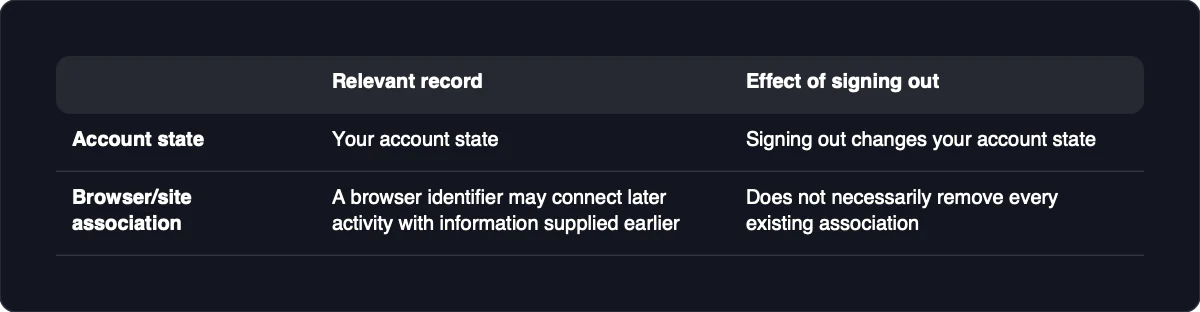
Recognition can also continue through a previously identified browser session. When tracking is linked to existing customer data, a browser identifier may connect later activity with information supplied earlier. Signing out changes your account state, but it does not necessarily remove every existing association between that browser and the site’s records.
Separately, some visitor-identification vendors claim they can return person-level details for a portion of visitors when an outside identity match is available, even without a form submission during that visit. That is a conditional matching claim, not something standard traffic measurement automatically provides. Such services do not offer a reliable way to identify and contact every anonymous visitor, and a claimed match should not be treated as proof that every associated request came from that person.
What an ordinary visit does not expose
An ordinary page visit does not automatically give the owner access to your private files, private messages, or the contents of other open tabs. Information you deliberately upload or submit is different: you are sending it to the destination. These limits describe ordinary browsing, not a compromised device or an exploited browser.
An IP lookup generally provides approximate location rather than a street-level address. More precise location can be shared when you grant browser location permission, and a street address can be supplied directly through a form. A location estimate derived from an IP address and an address you typed into a checkout form are therefore very different kinds of information.
Browsers may ask for permission before sharing location information. If you are concerned about a past visit, check whether you granted that permission rather than assuming an IP lookup revealed your home. If you entered an address yourself, changing your network connection does not remove the address already submitted.
A website also cannot ordinarily read the contents or URLs of your other open tabs. Shared advertising trackers may link some activity across participating sites, but that is different from reading every tab or your complete browser history. Likewise, messages not transmitted to the site are not automatically exposed just because you loaded one of its pages.
Reduce both network visibility and identity links
The most useful privacy approach addresses separate ways a site can recognize you: information you provide, browser-based identifiers, permissions, and the connection address. Reducing one does not automatically remove the others. Choose measures based on what you want the destination to learn less about.
-
Avoid unnecessary account logins and identifying submissions. Stay signed out when an account is not needed, and avoid supplying details unrelated to your task. Where appropriate, an email alias or disposable address can limit disclosure of your usual email address. This reduces direct identity links, but it does not erase an association the site already holds or prevent every possible outside match.
-
Use browser tracking protection and reject optional tracking. Review your browser’s protection settings and controls for third-party cookies. Reject optional tracking where the site provides that choice, while recognizing that a cookie banner is not proof that every form of collection stopped. If blocking breaks a page, restore only the necessary permission or a narrow site-specific exception rather than disabling protection everywhere.
-
Review location permissions. Check whether the site has permission to receive browser location information, and remove that permission if the page does not need it. This addresses location sharing through the browser, not the approximate location inferred from your connection’s IP address. If a feature genuinely needs your location, decide whether that disclosure is worth using the feature.
-
Use private browsing for session separation, not anonymity. A private browsing session separates routine cookie storage from your normal browsing session. It does not hide the connection’s public IP address, and signing into an account still gives the site an account identity to associate with your activity. Treat it as a way to reduce routine session carryover, not a way to make an identifying submission anonymous.
-
Consider different routing when IP exposure is your concern. A destination may see the public IP of a proxy or other intermediary connection rather than your usual connection address. Changing that address addresses a network signal; it does not remove cookies, undo account logins, or eliminate every browser fingerprint. A site can continue recognizing you through a retained identity link even after the public IP changes.
-
Verify account state, permissions, and routing separately. Review whether you are signed in and which permissions the site holds, then compare the public IP displayed by an IP check before and after changing routing. A changed result proves only which address that check received, not anonymity or coverage of all traffic. If the address does not change, inspect the routing configuration and any exclusions rather than assuming protection is active.
These checks answer different questions. Account state tells you whether you are presenting an account identity, permissions show what access you have granted, and an IP check shows the address received by that destination. None of those results alone establishes that a website cannot recognize your browser or connect the visit with earlier information.
If you have already visited
Clearing your browser’s site data can reduce future cookie-based linkage, but it does not erase records already held by the website or its providers. Logs and profiles may be retained for months or years. Changing your IP address afterward likewise does not alter the address recorded during a previous visit.
Start by reviewing what you actually shared. Were you signed in, did you submit an email address or other details, and did you grant location permission? Those facts help distinguish a routine technical record from a visit that had a direct account or contact-information link, though they cannot rule out every other matching method.
Next, review the website’s privacy policy for its collection and retention practices. Look for a privacy contact and any applicable process for requesting access to or deletion of your information. Available rights and procedures vary, and a request should not be assumed to remove every record held by every provider.
For future visits, revoke unnecessary permissions, clear unwanted local identifiers, and avoid reintroducing identity links through a login or form submission. These actions can limit later disclosure without rewriting the past. They cannot retrospectively establish that nobody reviewed the visit or associated it with your identity.